
TheTop review
AI Chief of Staff that turns email, calendar, and feed noise into one ranked daily brief.
TheTop is the cleanest way to get a ranked morning brief from your email and calendar, but it stays a read-and-prioritize layer rather than an assistant that executes work for you.
Pros
- Ranked daily brief genuinely reduces morning triage time
- Permanent free plan with one connected source makes it easy to test
- Passed Google and Microsoft CASA security verification; data not used for model training
- Adaptive memory learns which items you actually act on
- Covers personal and work priorities in a single brief
Cons
- Connected sources are capped on every plan (one on Free, five on Pro)
- No Slack, Notion, or project-tool sources: email, calendar, and feeds only
- Informs and prioritizes but does not execute tasks for you
- Newer product with a shorter track record than established email tools
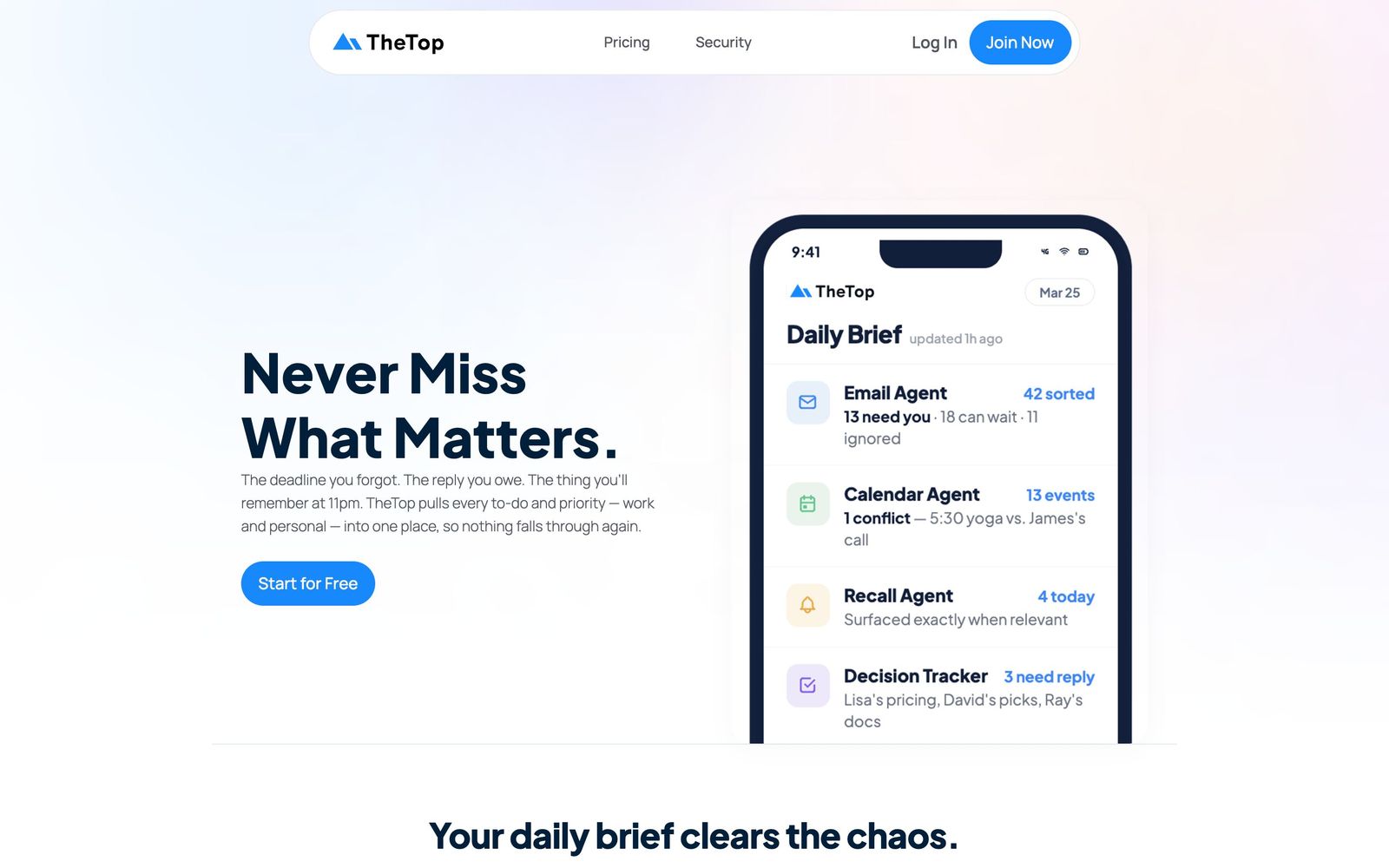
TheTop is an AI Chief of Staff that connects to your email and calendar, then turns the day's noise into a single ranked daily brief. Instead of opening Gmail, Outlook, and a calendar app separately each morning and reconstructing what matters, you open one screen where priorities are already surfaced, ranked, and prepared. The company says it has delivered more than 1.28 million customized briefings, and the product has passed Google and Microsoft's CASA security verification. This review looks at what the AI assistant actually does well, where it fits in a founder's stack, and where it falls short.
What TheTop actually does
TheTop sits on top of the accounts you already use. You connect Gmail or Outlook, Google Calendar or Microsoft 365, and optionally RSS and news feeds. Background agents then read what came in, enrich it with context pulled from the web, and assemble a morning brief: what needs a decision, what needs a reply, what is on the calendar, and what can safely be ignored. The pitch is deliberately narrow. TheTop is not trying to replace your task manager or your inbox; it is a prioritization layer that sits upstream of both. Over time the system learns your preferences, so the ranking adapts to what you actually open and act on rather than treating every unread message as equally urgent.
Key features
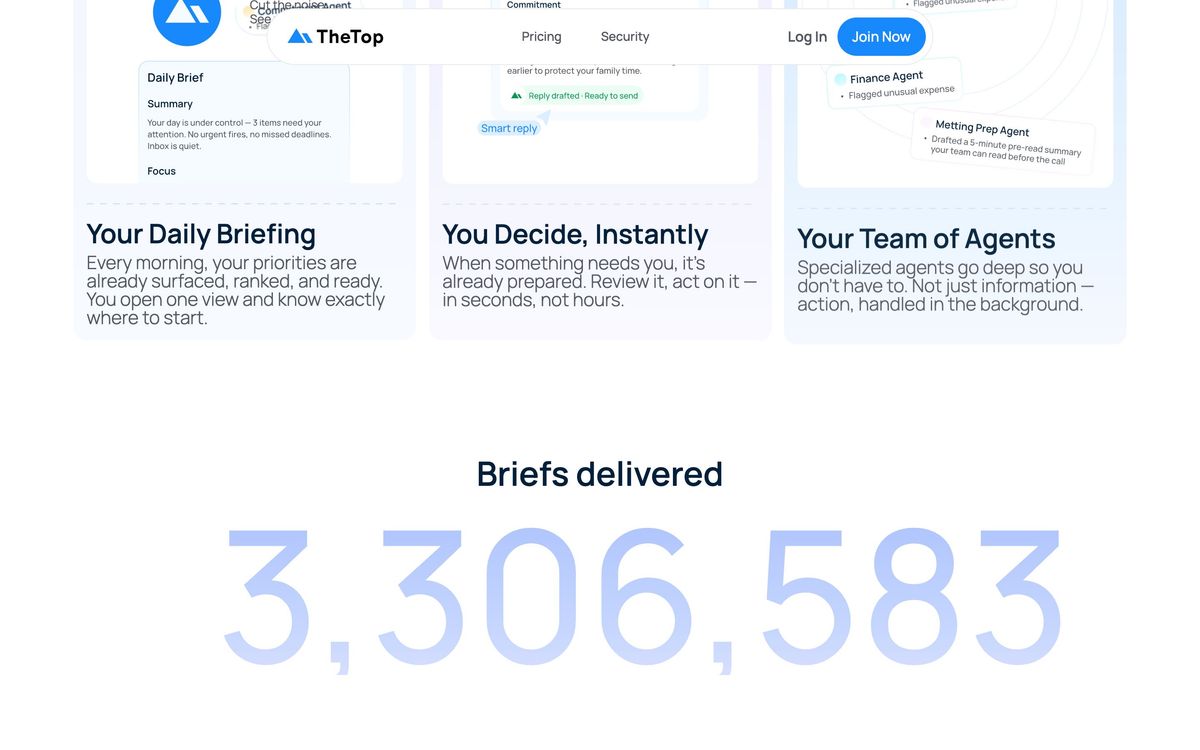
- Morning brief that pulls work and personal priorities into one ranked view
- Connectors for Gmail, Google Calendar, Outlook, and Microsoft 365, plus RSS and news feeds
- Background AI agents that prepare context and suggested actions before you ask
- Adaptive memory and learning on the Pro plan, so the brief improves with use
- Quick actions and smart reply for handling items directly from the brief
- A permanent free plan with a limited daily brief and one connected source
- Customer data is not used to train or fine-tune AI models
Who it's for
TheTop is aimed at people whose problem is volume, not organization: founders, executives, small business owners, and anyone running a calendar full of meetings on top of a noisy inbox. If your mornings start with twenty browser tabs and a scan through three inboxes, a ranked brief genuinely saves time. It also handles personal commitments alongside work ones, which suits solo founders whose lives do not split cleanly in two. It is less compelling if your work lives mostly in Slack, Notion, or a ticketing system, since those are not first-class sources today; the brief is only as good as the email and calendar data feeding it.
How it compares
The closest well-known neighbors solve adjacent problems. Motion is an AI calendar and project management tool: it schedules your tasks into time blocks and manages projects, but it does not read your inbox and tell you what matters. Superhuman speeds up email triage inside the inbox itself, while TheTop works one level up, deciding which messages deserve your attention at all. Among dedicated AI chief of staff products, TheTop's differentiators are the genuinely free entry plan, the privacy posture, and the focus on a single ranked brief rather than a chat interface you have to interrogate.
Verdict
TheTop does one job (the daily brief) and does it well. The free plan with one connected source is a real, low-risk way to test whether a ranked morning brief changes your day, and the upgrade path adds sources, refreshes, and adaptive memory rather than gimmicks. The tradeoffs are real too: source limits on every tier, no deep integrations beyond email, calendar, and feeds, and a product that informs rather than executes. If inbox and calendar noise is your bottleneck, it earns its place; if you need an agent that does the work for you, look elsewhere.
Ready to try TheTop?
There's a free tier, so you can test it before committing.
More founders tools like TheTop
Fastmail
4.3Paid, ad-free email hosting with custom domains, masked addresses and calendars, built on open standards.
Read Fastmail review →Proton for Business
4.1End-to-end encrypted email, calendar, drive, password manager and VPN for teams, run from one admin panel.
Read Proton for Business review →1Password
4.5Team password manager and credential vault that has grown into a wider access platform for small IT teams.
Read 1Password review →Miro
4.5Infinite shared canvas for workshops, diagrams and planning, now wrapped around docs, tables and AI.
Read Miro review →Activepieces
4.4Open-source, MIT-licensed AI automation platform with a visual builder, AI agents, and 700+ integrations.
Read Activepieces review →MindStudio
4.4No-code visual builder for AI agents with 200+ models, 1,000+ integrations, and flexible deployment.
Read MindStudio review →