
Switcher Studio review
Turns iPhones and iPads into a synced multi-camera live production and streaming desk.
The cheapest credible way to run a multi-camera live show without a hardware switcher, though the production device has to be Apple and the network setup is unforgiving.
Pros
- Up to nine iPhone or iPad cameras sync wirelessly into one production, with no capture card or switcher hardware.
- Cuts, overlays, lower thirds and pre-recorded clips are placed live, so a finished stream needs no post-production.
- The upper tier multistreams to twenty destinations and embeds the same stream on the brand's own site.
- Monetization is native: ticketed events, pay-per-view, subscriptions and donations with a flat per-transaction fee.
- The clip creator cuts vertical social clips out of a finished stream inside the same app.
Cons
- The production device must be an iPhone, iPad or Mac; Android and Windows devices can only join as remote cameras or screen shares.
- Every device has to sit on the same Wi-Fi network and frequency band, and NDI camera support is still labelled beta.
- Reviewers report having to restart the app, the network or a device mid-production more often than a hardware switcher would need.
Switcher Studio pricing
List prices in USD per month, taken from the vendor at review time.
| Plan | Per month | What it covers |
|---|---|---|
| Studio | $45 | billed annually; $65 month to month, multistreaming to 2 destinations |
| Suite | $79 | billed annually; $99 month to month, 20 destinations, hosting and monetization |
What Switcher Studio actually does
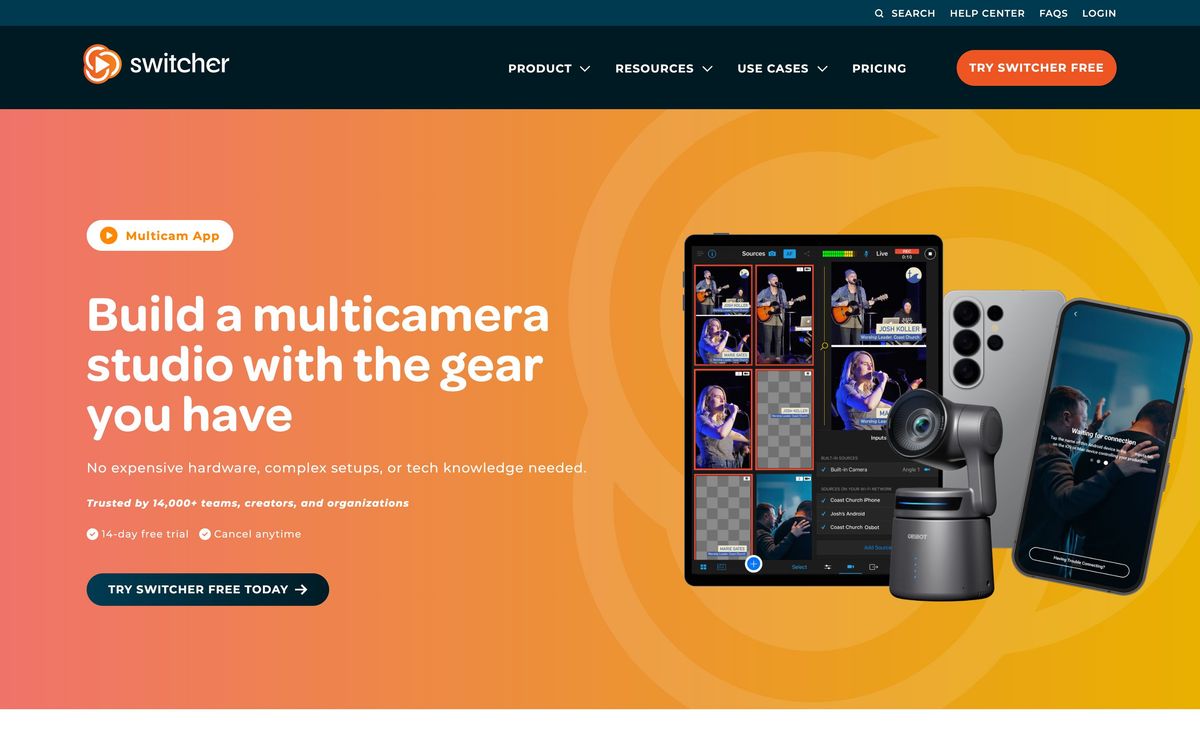
Switcher Studio replaces a hardware video switcher with an app. Several iPhones or iPads are placed around a room, joined to the same Wi-Fi network and paired to one production device, which then acts as the control surface: preview every angle, cut between them, drop in graphics, and push the result to a streaming destination in real time. Up to nine cameras can be synced into a single production, and existing cameras can be brought in over HDMI capture or NDI rather than replaced.
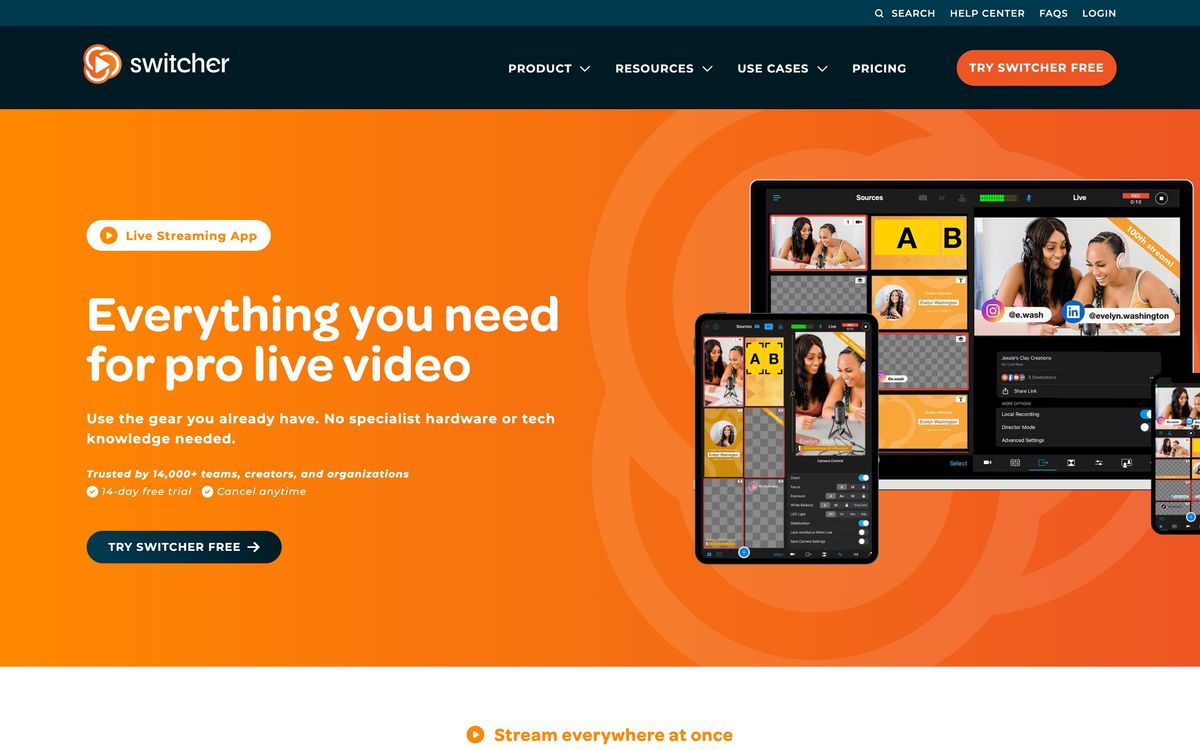
The production itself is finished as it happens. Lower thirds, titles, scoreboards, picture-in-picture layouts and pre-recorded clips are triggered live, so what viewers see is what gets recorded, and there is no editing pass afterwards. Beyond the switching layer, the company sells a hosting and monetization tier: a video library, custom players embedded on the brand's own domain, password protection, ticketed events, pay-per-view and subscriptions, with a flat fee on each transaction. Streams go out to YouTube, Facebook, Instagram, TikTok, X and Twitch, and the higher plan multistreams to as many as twenty destinations at once.
Key features
The list is short because the product is deliberately one job done thoroughly.
- Multi-camera switching across up to nine synced Apple devices on a shared Wi-Fi network
- Up to five remote guests joined into the live production
- Live graphics: lower thirds, titles, scoreboards, picture-in-picture and video roll-ins
- Instant replay of the last 10, 20 or 30 seconds
- Multistreaming to up to 20 destinations, plus embedding on the brand's own site
- Ticketing, pay-per-view, subscriptions and custom video players on the hosting tier
Who it's for
The natural buyer runs the same show repeatedly and cannot justify a hardware kit or a camera operator: a church broadcasting weekly services, a gym or studio streaming classes, a school covering games, a retailer running live shopping. In those cases the equipment already exists as staff phones, and the recurring fee replaces both a switcher and an editor. The monetization tier matters for anyone who wants to sell access rather than build an audience on someone else's platform.
It is the wrong choice for a team standardized on Windows or Android, since only Apple hardware can run the production, and for anyone streaming from a venue with unreliable or segmented Wi-Fi, because every device must share one network and band. Producers who need deep audio routing, hardware control surfaces or broadcast-grade redundancy will outgrow it quickly.
How it compares
OBS Studio is free and endlessly configurable, but it runs on a desktop, expects a capture card for every camera and offers nothing on monetization. Ecamm Live is the closest peer for Mac users and is stronger on desktop workflow and integrations, while Switcher is stronger on wireless multi-camera capture from phones. StreamYard and Restream are easier still and better for interview-style shows with remote guests, but they cannot orchestrate several in-room angles, which is the whole point here. Against a hardware unit such as the ATEM Mini, Switcher trades reliability and latency for a fraction of the setup and no cabling.
Verdict
Switcher Studio does something no cheap alternative does: it makes a genuine multi-camera in-room production possible with devices a small organization already owns, and it finishes the show live so nobody has to edit afterwards. The monetization and hosting layer is a reasonable second act for teams selling access to their content. The constraints are equally clear. The Apple requirement for the production device is absolute, the shared-network dependency is fragile in real venues, and the app needs restarting more often than a hardware switcher ever would. For a recurring show on Apple hardware with a stable network, it is good value; for anything mission-critical, keep a backup plan.
Ready to try Switcher Studio?
More creators tools like Switcher Studio
Gamma
4.5AI design partner that generates presentations, documents, websites, and social content from a prompt.
Read Gamma review →Riverside
4.5Browser recording studio that captures every remote guest locally in 4K, then edits and publishes the episode.
Read Riverside review →Consensus
4.4AI search engine over 200M+ academic papers, with a Consensus Meter showing where the science agrees.
Read Consensus review →QuillBot
4.4AI writing suite used by 35M+ writers: paraphrasing, grammar checking, summarizing, and citations.
Read QuillBot review →Murf AI
4.3Generative speech platform with 200+ voices in 35+ languages: studio voiceovers, dubbing, and a real-time API.
Read Murf AI review →Pangram Labs
4.3Research-backed AI detection with independently verified accuracy, covering 20+ languages and major LLMs.
Read Pangram Labs review →