
airSlate review
Document suite behind signNow and pdfFiller: e-signature, PDF editing and form workflows.
Unusually good value for teams that need many people signing and editing documents, though the overlapping product family makes it hard to tell what a given subscription covers.
Pros
- Every signNow plan includes unlimited users, so adding an office manager or a second signer costs nothing
- pdfFiller handles the editing side properly: rewriting text inside a PDF, redacting, merging and rearranging pages
- Compliance coverage is broad for the price, including SOC 2 Type II, HIPAA through a BAA, 21 CFR Part 11 and eIDAS
- A per-signature site licence exists for high-volume senders who do not want a seat-based subscription
- The pdfFiller top tier bundles the US Legal Forms library of state-specific documents
Cons
- The portfolio overlaps confusingly: signNow, pdfFiller, DocHub and the automation platform each sell adjacent features under different subscriptions
- Salesforce, NetSuite and full API access sit on the most expensive signNow tier, so integration-led buyers pay near enterprise rates
- Support is the most common complaint in reviews, with slow replies and difficulty reaching a person after onboarding
airSlate pricing
List prices in USD per month, taken from the vendor at review time.
| Plan | Per month | What it covers |
|---|---|---|
| signNow Business | $8 | per user, billed annually, unlimited users; $20 month-to-month |
| signNow Business Premium | $15 | per user, billed annually, adds bulk send and payments; $30 month-to-month |
| signNow Enterprise | $30 | per user, billed annually, adds Salesforce, NetSuite and API access; $50 month-to-month |
| pdfFiller Premium | $15 | per user, annual commitment; includes signNow Premium and the US Legal Forms library |
What airSlate actually does
airSlate is the company behind a set of document tools rather than a single application, and understanding the split is most of the buying decision. signNow is the e-signature product: send a document, set a signing order, collect a legally binding signature, keep the audit trail. pdfFiller is the editing product: change the text inside a PDF, redact, merge, split, convert, and turn a static file into a fillable form. DocHub does a lighter version of the same job inside Google Workspace. A separate automation platform strings those steps into routed workflows with approvals and conditions, and a legal forms library supplies state-specific templates.
The pricing model is the notable part. Where most e-signature vendors charge per seat and then meter documents, signNow includes unlimited users on every plan and charges for capability instead. A five-person office and a fifty-person one pay the same for the entry tier. Everything runs in the browser with mobile apps for signing, add-ins for Google Docs, Gmail and Microsoft tools, and an API on the top plan for teams generating documents from their own systems.
Key features
What the subscription actually delivers:
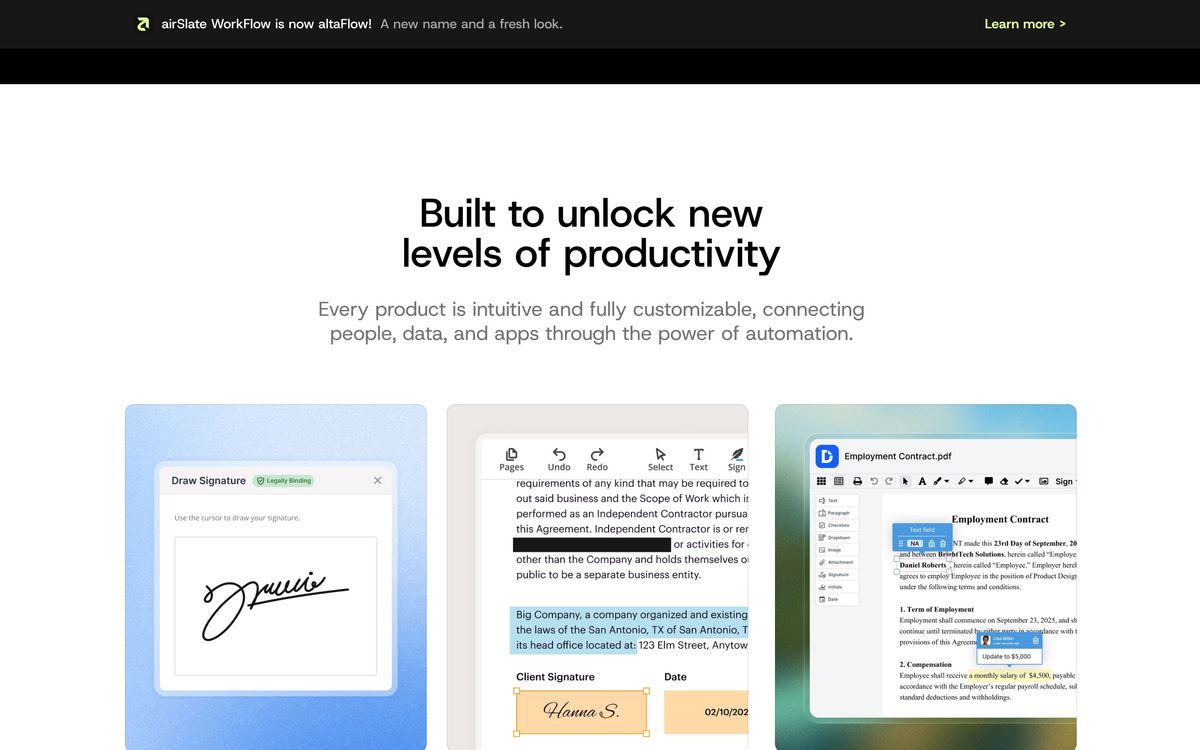
- E-signature with signing order, automated reminders, court-admissible audit trail, and bulk invites on the middle tier
- PDF editing, redaction, page reordering and format conversion through pdfFiller
- Reusable templates, fillable web forms, and payment requests collected alongside a signature
- Workflow automation with conditional routing, approvals and scheduled sending
- Security controls including advanced signer authentication, single sign-on and qualified electronic signatures
- Integrations with Google Workspace and Microsoft tools throughout, with Salesforce and NetSuite reserved for the enterprise tier
Who it's for
The clearest case is a small business where signing is spread across people who each send a few documents a month: a clinic, a property manager, a construction firm, a staffing agency. Unlimited users makes that pattern cheap in a way per-seat competitors cannot match, and pdfFiller covers the messy reality that most incoming paperwork arrives as a PDF someone needs to alter. High-volume senders can move to per-signature pricing instead of seats.
It is a weaker fit for teams whose signature flow lives inside a CRM. Those integrations are gated to the most expensive tier, which erases the price advantage. Buyers who expect hand-holding should also weigh the support record carefully, since slow responses after onboarding are the most frequent complaint in reviews. Anyone comparing plans should map the required features first, because the same capability sometimes appears under a different product name at a different price, and the middle signing tier is where most of the useful sending features actually begin.
How it compares
DocuSign is the safer institutional choice, with a deeper integration catalogue and better support, at several times the per-user cost and with per-seat maths that punishes occasional signers. Dropbox Sign is simpler and pleasant to use, but thinner on workflow, forms and compliance options. Adobe Acrobat covers PDF editing better than pdfFiller and costs more for signature workflows at team scale. airSlate wins on price per person and on covering both editing and signing; it loses on polish, coherence and service.
Verdict
For a small team that signs and edits documents constantly, the airSlate family is one of the better-value options available, and the unlimited-user policy is a genuine structural advantage rather than a marketing line. The rating stays moderate because the experience around the products is uneven: four overlapping brands make it easy to buy the wrong subscription, the useful CRM integrations are held back for the top tier, and support quality is a recurring theme in customer reviews. Good economics, imperfect execution.
Ready to try airSlate?
More founders tools like airSlate
monday.com
4.3Board-based work platform where typed columns drive timelines, dashboards and automated hand-offs.
Read monday.com review →Typewise
4.3AI agent platform that resolves customer service requests end-to-end across CRM, ERP, and helpdesk systems.
Read Typewise review →SmartSuite
4.2Structured records, views, dashboards and automations in one platform for teams outgrowing spreadsheets.
Read SmartSuite review →Turbotic Automation AI
4.2No-code automation platform where you build and run workflows by chatting with AI in natural language.
Read Turbotic Automation AI review →Dry Ground AI
4.1AI lab behind CompanyClaw, an autonomous business operator, and Nexa, a delivery platform for AI consultants.
Read Dry Ground AI review →Glide
4.1Turns a spreadsheet or database into a mobile and desktop business app without code, with role-based views per user.
Read Glide review →