
Shoeboxed review
Receipt scanning with human verification, including a prepaid envelope service for shoeboxes of paper.
The only mainstream receipt tool that will take a physical envelope of paper off your desk and key it in by hand, though the scan allowances on the lower plans run out faster than most bookkeeping clients do.
Pros
- Every extracted receipt is checked by a human data-entry team, which is why accuracy on faded, crumpled and handwritten paper holds up better than pure OCR tools
- The prepaid Magic Envelope means a client can post a bag of paper and see it in the account days later without anyone photographing anything
- Receipts are sorted into fifteen standard tax categories, so the export lands in a shape an accountant can actually use
- Five submission routes, envelope, mobile app, email forwarding, Gmail import and drag-and-drop, cover both paper and digital habits
- Data exports on demand to QuickBooks Online, Xero, Wave and Zoho Expense, so the archive is not a hostage
Cons
- The entry plan allows thirty digital scans a month, twenty paper documents a year and a single prepaid envelope a year, which is thin for anything beyond a sole trader
- That same entry plan keeps documents for three years only, while the higher tiers retain them for the life of the account
- Reviewers repeatedly report the automatic email import over-collects, pulling in messages that are not receipts and leaving manual cleanup behind
Shoeboxed pricing
List prices in USD per month, taken from the vendor at review time.
| Plan | Per month | What it covers |
|---|---|---|
| Starter | $9 | 30 digital scans a month, 20 paper documents a year, 1 user |
| Pro | $29 | 200 digital scans a month, 20 paper a month, 3 users |
| Plus | $79 | 750 digital scans a month, 50 paper a month, 10 users |
| Paper Plus | $179 | 200 paper documents a month and two envelopes a month, 10 users |
What Shoeboxed actually does
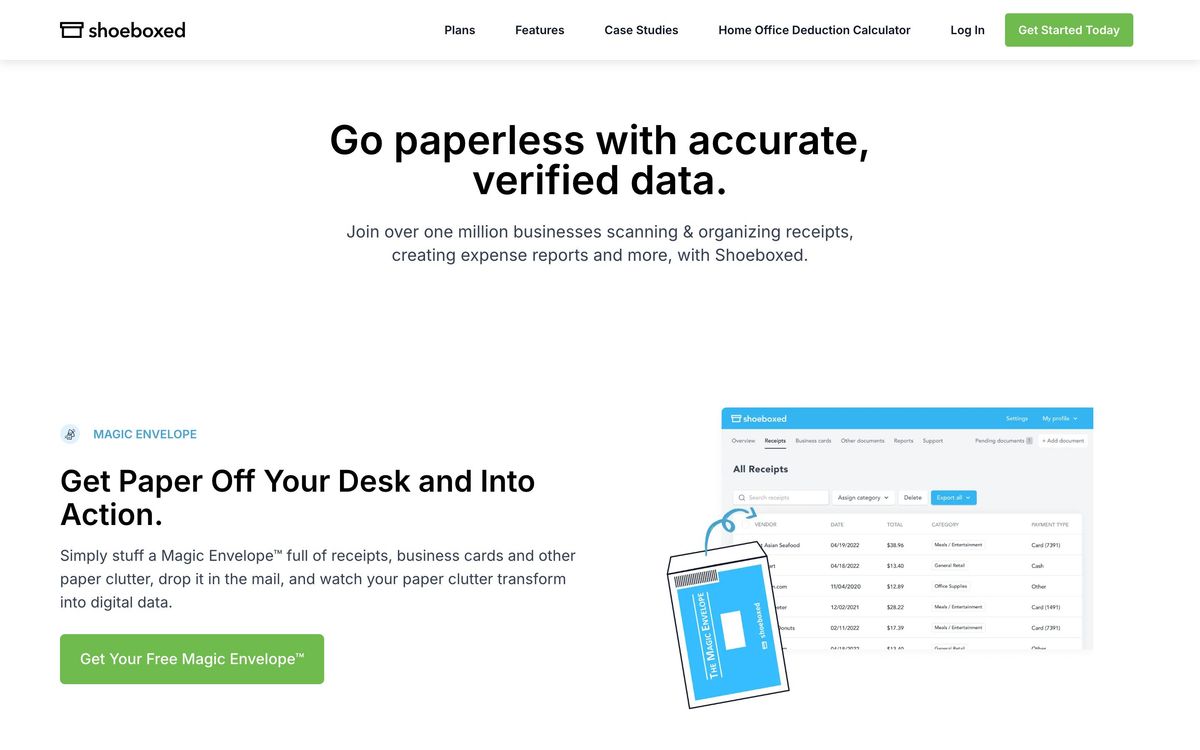
Shoeboxed turns receipts into structured, searchable expense data, and it is unusual in one respect: it will accept the receipts as physical paper. The service posts you a prepaid envelope, you stuff it with the contents of a glovebox or a carrier bag, and a few days later the scanned images and keyed data appear in your account. Digital receipts arrive by the more familiar routes, a phone camera, a forwarding address, a Gmail import, a drag-and-drop upload, and end up in the same archive.
The extraction itself is optical character recognition followed by human review. A data-entry team checks vendor, date, total and tax before the record is committed, which is slower than a purely automated tool and noticeably more reliable on the material that defeats automation: thermal paper that has faded, handwritten totals, receipts folded into eighths. Records are filed into fifteen standard tax categories, kept as legible images for audit purposes, and exported on demand to QuickBooks Online, Xero, Wave or Zoho Expense. The archive, not the automation, is the product.
Key features
The feature list is short because the job is narrow, and most of it exists to get paper into a database.
- The Magic Envelope, a prepaid postal envelope processed at the vendor's scanning facility
- Human verification of every extracted field, rather than confidence scores and a review queue you have to work through yourself
- Automatic categorisation into fifteen tax categories, with a full-text search across scanned images
- Expense reports that attach the underlying receipt image for reimbursement or deduction support
- A mileage tracker bundled with the iOS and Android apps
- Multi-user access from the mid tier upward, so a bookkeeper and a client can share one archive
Who it's for
The clearest buyer is a bookkeeper with clients who have not gone paperless and never will, trades, restaurants, small retail, anyone whose expense records arrive in an envelope in April. For those accounts the envelope service is worth more than any feature comparison, because it removes the single task nobody wants: sitting at a desk photographing three hundred pieces of paper.
It is the wrong tool for a company whose spend already flows through cards and invoices. If receipts arrive as PDFs from suppliers and card feeds reconcile automatically, an expense platform that starts from the transaction rather than the paper will do more with less effort. It is also awkward for anyone with high volume on a budget: the plans are shaped around modest document counts, and the tier that handles a genuinely paper-heavy business costs several times the entry plan.
How it compares
Dext sits at the same job with better bookkeeping-practice tooling, client management, publishing straight into a ledger, supplier rules, and no equivalent to the mail-in envelope. Hubdoc, bundled with Xero subscriptions, is effectively free for Xero firms and adequate for fetching statements and digital bills, but it is weaker on messy paper and offers no human verification. Expensify covers the wider expense workflow, approvals and card reconciliation included, and treats receipt capture as one step of many rather than the whole point. Shoeboxed wins on paper and loses on workflow.
Verdict
This is a specialist that has resisted the temptation to become a general expense platform, and it is better for it. The human review step is a real differentiator rather than a marketing line, and the envelope solves a problem no competitor is willing to touch. The caveats are about capacity and value: the entry plan's allowances and three-year retention will not survive contact with a real client, the automatic email import needs supervising, and the price per scanned document only starts to look reasonable at the higher tiers. Buy it for the paper, and check the document limits against a real month before subscribing.
Ready to try Shoeboxed?
More accountants tools like Shoeboxed
Xero
4.5Cloud accounting platform that runs a firm's books: the ledger everything else plugs into.
Read Xero review →Ignition
4.5Client engagement for accounting firms: proposals, engagement letters, and automated billing in one flow.
Read Ignition review →Zoho Books
4.4Cloud accounting and ledger software for small and mid-size businesses, part of the wider Zoho suite.
Read Zoho Books review →BILL
4.4Category-leading AP/AR automation for US firms, with a free Spend & Expense module bundled in.
Read BILL review →DataSnipper
4.4Excel-native AI document extraction and matching for audit and finance teams.
Read DataSnipper review →Gusto
4.4Full-service US payroll, benefits and HR with a genuinely strong accountant partner dashboard.
Read Gusto review →